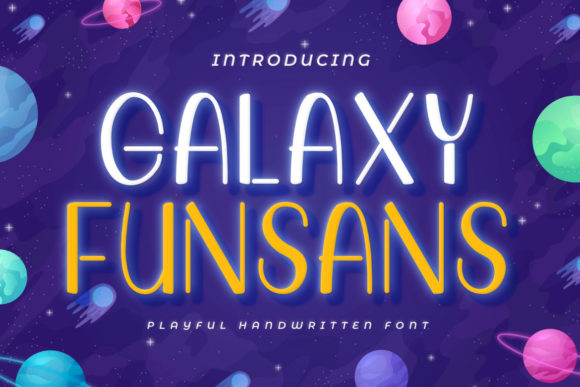
Galaxy Funsans: A Playful Display Font for Digital Branding and Web Design
As a web designer, choosing the right typeface can make or break a digital experience. Galaxy Funsans is a display font that brings a sense of joy and creativity to any layout. It’s not just about aesthetics—it’s about how the font supports readability, visual hierarchy, and brand tone in real-world web applications.
Galaxy Funsans has a rounded, bouncy structure with a slightly whimsical character. This makes it ideal for projects that need to feel approachable and energetic. The font’s open letterforms and generous spacing help maintain clarity, even at smaller sizes. It works particularly well when used for short bursts of text—think headlines, buttons, and logo treatments—where its personality can shine without overwhelming the layout.
Using Galaxy Funsans in Website Headers and Hero Sections
In digital design, the hero section is often the first impression a user gets of a brand. Galaxy Funsans can be a strong choice for hero titles, especially for creative brands, children’s products, or lifestyle services. Its playful tone adds warmth and invites interaction, making it a good fit for landing pages, course sales pages, and boutique online stores.
When used in headers, Galaxy Funsans benefits from being paired with a more neutral typeface. A clean sans serif like Open Sans or Lato works well for subheadings and body copy, ensuring that the layout remains balanced and readable. This kind of font pairing creates a clear visual hierarchy while keeping the design modern and intentional.
Galaxy Funsans in Conversion-Focused Layouts
For digital product creators and SaaS founders, the goal is often to guide users toward a specific action—whether that’s signing up, purchasing, or downloading. Galaxy Funsans can be used effectively in call-to-action areas when applied thoughtfully. For example, using it in a styled button with ample contrast and spacing can make the action feel more engaging, especially in a playful or creative niche like digital art tools, children’s apps, or design courses.
However, because it’s a display font, Galaxy Funsans should be reserved for short, high-impact text. Avoid using it for long paragraphs or small interface elements where clarity is critical. Instead, let it anchor a section and build emotional connection, while supporting fonts handle the functional communication.
Branding and Identity with Galaxy Funsans
Brand consistency is key in digital experiences. Galaxy Funsans can serve as a signature element in a brand’s visual language. Whether it’s used in a logo, a social media graphic, or an email header, the font helps reinforce a brand personality that’s fun, friendly, and fresh.
For creative entrepreneurs, bloggers, and marketers, Galaxy Funsans can be part of a broader brand kit that includes custom illustrations, pastel color palettes, and hand-drawn icons. It works especially well for lifestyle brands, wellness coaches, and educational platforms targeting younger audiences or creative professionals.
Readability Considerations for Mobile and Responsive Design
When using Galaxy Funsans on mobile devices, it’s important to test legibility at smaller sizes. While the font is designed for clarity, its decorative nature means it can lose definition on low-resolution screens or when compressed in tight spaces. To avoid this, use it at a minimum of 18–20px for mobile headers and ensure adequate letter spacing.
Dark backgrounds can also affect how the font appears. Galaxy Funsans performs well on light backgrounds, but when used over images or dark overlays, consider adding a subtle text shadow or background blur to improve contrast and readability. These small adjustments ensure the font remains effective across different design contexts.
Font Pairing Strategies for Web Design
One of the most powerful ways to use Galaxy Funsans is through strategic font pairing. Since it’s a display font, it should be balanced with a more functional typeface in the supporting roles. For example, using a minimalist sans serif like Montserrat or Raleway for body text keeps the layout clean and scannable, while Galaxy Funsans adds visual interest in section headers or featured content.
For editorial-style websites or creative blogs, you might also consider pairing it with a serif font like Playfair Display or Merriweather for a more refined contrast. This kind of combination can help define different content zones, guiding the user’s eye naturally through the page while maintaining a cohesive brand voice.
Technical and Licensing Considerations
Before implementing Galaxy Funsans in a live website or client project, it’s important to verify the font’s technical specifications. Check for webfont availability, multilingual support, and included styles such as bold, italic, or alternate characters. Many display fonts offer stylistic alternates that can add variety to headlines without changing the typeface.
Licensing is another key factor. Ensure the font includes a commercial license that covers web use, whether you're embedding it in a client site, online store, or digital template. Some platforms require specific permissions for font hosting, so always review the license agreement to avoid potential legal issues down the line.
Real-World Applications of Galaxy Funsans
Here are a few practical examples of where Galaxy Funsans can enhance a digital experience:
- Creative portfolios: Use it in a hero section to introduce your work with a friendly, artistic tone.
- Boutique shops: Apply it in promotional banners or product tags to highlight seasonal sales or curated collections.
- Coaching websites: Feature it in testimonials or callout sections to add warmth and personality.
- Course landing pages: Use it in headlines to make educational content feel more engaging and accessible.
- Blog headers: Style it over featured images to create a strong visual hook for readers.
Each of these applications benefits from Galaxy Funsans’ ability to communicate tone quickly and effectively. When used with intention, it becomes more than just a font—it becomes a tool for emotional connection and user engagement.